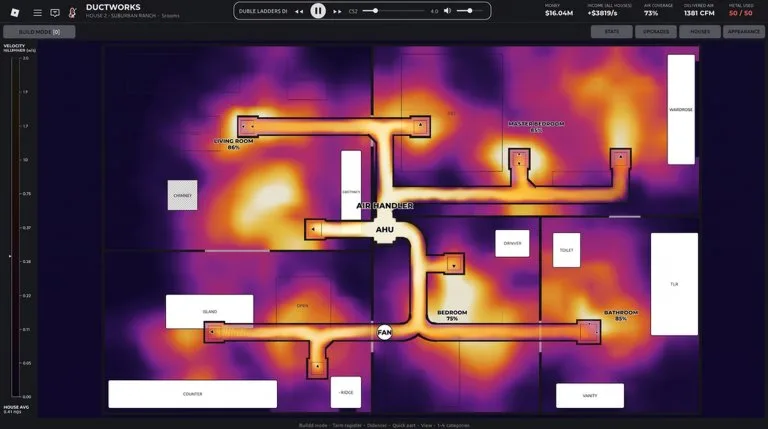
The only control instruction in the official description is that controls are on the bottom of the screen. Button names, rotate keys, and delete keys are not published. Click or tap through that bar at the start of a session and use the label you can see.
A short route you can inspect
- Pick the placement control on the bottom bar.
- Put down a short run whose openings meet. Leave enough room around the pieces that you can still see the joints.
- Look at the result the game gives you before you add a turn or a branch.
- If you change direction, check both sides of that joint, then look again.
- Add the next branch only after the previous route still behaves the way you wanted.
This order is a way to debug. It is not a claim that the game scores you for building slowly.
Pipes and walls
A player on the same beginner video wrote that you can put pipes over walls. That is one player's report, not a line in the official description. If a piece will not sit where you want it, try the placement the bar is offering and look at the joint. Do not assume every fitting crosses a wall.
When the route looks finished and still fails
Players working with directional pieces, especially the one-way transition, describe a route that looks connected while flow stops at one joint. Check the facing of the last piece you placed before you delete the whole run. There is no published list of error messages.
PC and mobile
Both use the same bottom bar. PC aiming is the mouse. Mobile aiming is touch, so zoom in before you commit a corner. No official note says mobile is missing a tool that PC has.
Shared servers
Up to 20 people can be in one server. Nothing in the listing assigns roles. If someone else is editing the joint you are editing, you will not know which change you just tested. Agree on a section, or build your own short test run. More on that is in Play a shared server.
Next, name the fittings players actually ask for in Transitions and named fittings.